


PhantomKeys™ RGB Mechanical Keyboard
A compact RGB keyboard that upgrades your setup with more desk space, responsive keys, and plug-and-play simplicity.
Only 9 left in stock — order soon
Estimated delivery: Aug 05 – Aug 10
- Easy Returns
- Reliable Quality
- Free Shipping
Product specifications
Product specifications
61 keys, 60% compact layout (no numpad). Multi-color RGB with adjustable brightness and effect speed. Membrane switches with an advanced mechanical-feel design. IPX4-rated splash-resistant circuit board. Wired USB connection. Compatible with PC, Mac, PS4, Xbox One, and Windows 7/8/10/11.
What's in the box
What's in the box
PhantomKeys™ Keyboard, USB Cable, User Manual.
30-Day Money Back Guarantee
30-Day Money Back Guarantee
We want you to feel confident in your purchase. PhantomKeys is built and tested for everyday use. If anything comes up, our support team has your back — with easy returns and a quick resolution process.


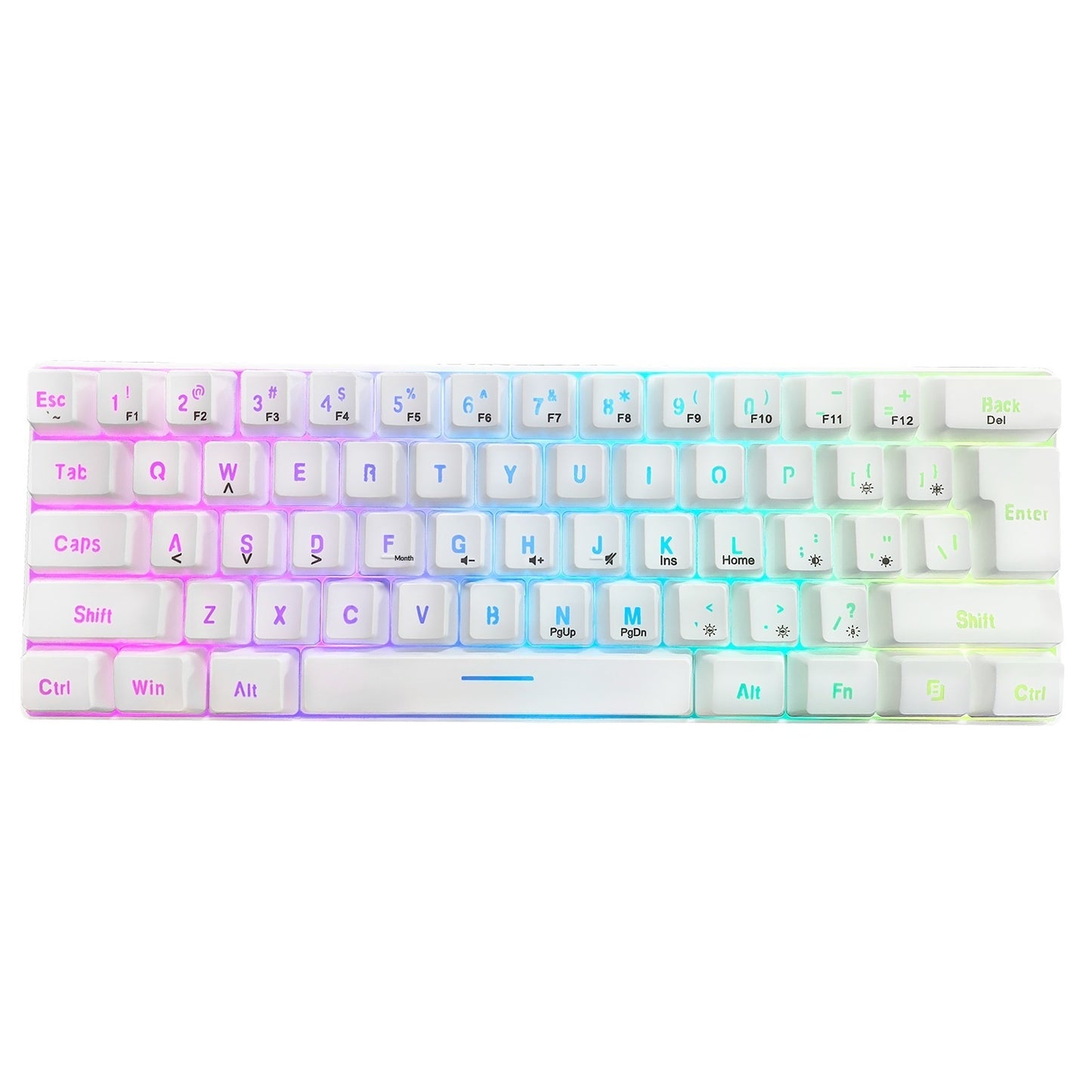

More Desk Space, More Comfort
The compact 60% layout frees up valuable space for smoother mouse movement while keeping your setup clean, organized, and comfortable to use every day.

YOUR SETUP, YOUR STYLE
Personalize your desk with customizable RGB lighting that looks just as good during the day as it does at night. Whether you're working or gaming, every session feels a little more yours.

Still Enjoying It Six Months From Now
Built for everyday comfort and reliable performance, PhantomKeys™ is made to keep up with work, gaming, and everything in between. It feels just as satisfying months from now as it does on day one.
What Customers Are Saying

Really happy with this keyboard. It freed up so much space on my desk. The keys feel responsive, and the lighting adds a nice touch. Lightweight but still feels solid — great for everyday use.

The typing experience feels close to way more expensive keyboards, and the price is great. Setup was simple and it feels solid overall. Really happy with this one.

Works exactly like a keyboard should. RGB looks cool too, and it ran perfectly plugged into my Xbox.
Frequently Asked Questions
What devices is PhantomKeys compatible with?
It works with PC, Mac, PS4, and Xbox One, and supports most Windows versions including 7, 8, 10, and 11. Some shortcut functions may vary depending on your operating system.
What happens if I spill water or coffee on it?
The circuit board is IPX4-rated for splash resistance, so it's protected against accidental spills. That said, the USB connection itself is not waterproof, so we recommend keeping liquids away whenever possible.
Can I return it if I don't like it?
Yes — you can return it easily under our return policy. Check our returns page for full details.
Is PhantomKeys™ a mechanical keyboard?
PhantomKeys™ uses premium membrane switches engineered to deliver a satisfying mechanical-style typing experience. You get responsive, comfortable keystrokes with lower noise and a more approachable price than traditional mechanical keyboards.
Who is PhantomKeys™ designed for?
PhantomKeys™ is perfect for casual gamers, students, remote workers, first-time setup builders, and anyone looking for a compact keyboard that feels great without the premium price tag.
What does a 60% keyboard mean?
A 60% layout removes the dedicated number pad to create a smaller footprint, giving you more room for mouse movement while keeping the essential keys you use every day. Additional functions remain accessible through Fn key combinations.
Can I customize the RGB lighting?
Yes. PhantomKeys™ includes multiple RGB lighting effects along with adjustable brightness and animation speeds, allowing you to personalize your setup to match your style.
Is it plug and play?
Absolutely. Simply connect the keyboard using the USB cable and you're ready to go. No drivers or software are required for everyday use.
Is this keyboard suitable for gaming?
Yes. The compact layout provides extra desk space for mouse movement, while the responsive mechanical-feel keys make it a great choice for gaming, studying, and everyday use.
Is it comfortable for long typing sessions?
Yes. PhantomKeys™ features an ergonomic key profile designed to stay comfortable during extended gaming, work, or study sessions.
Does it save my lighting settings?
Yes. Your selected lighting effect is retained after the keyboard is powered off, so you don't have to reconfigure it every time you use it.
Does PhantomKeys™ make a lot of noise?
No. The membrane switches provide a satisfying mechanical-style feel while remaining quieter than most traditional mechanical keyboards, making them suitable for shared spaces and late-night sessions.
Is this a good first gaming keyboard?
Absolutely. PhantomKeys™ is designed for people who want a cleaner setup, responsive typing, customizable RGB lighting, and reliable everyday performance without the complexity or cost of enthusiast keyboards.
Does it include dedicated arrow keys?
Because of its compact 60% layout, dedicated arrow keys are integrated into secondary functions and can be accessed using Fn key combinations. This design keeps the keyboard compact while preserving essential functionality.
Why choose PhantomKeys™ over a full-size keyboard?
If you value a cleaner desk, more mouse space, and a minimalist setup without sacrificing everyday functionality, PhantomKeys™ delivers a better balance of comfort, aesthetics, and practicality than a traditional full-size keyboard.